Getting the RRB photo and signature size right is one of the most important steps when filling out your Railway Recruitment Board application. Many candidates who are fully eligible for RRB NTPC, RRB Group D, RRB JE, or RRB ALP end up having their applications rejected for one simple reason – incorrect photo or signature upload. This is something that can be easily avoided with the right information.
The Railway Recruitment Board has strict rules about the format, dimensions, file size, and quality of the photo and signature that candidates upload. These rules are designed to ensure proper identification during the exam and at document verification. If your photo or signature does not match the required specifications, your form may be rejected without any refund of the application fee.
This article covers everything you need to know about the correct RRB photo and signature size for 2026. You will find exact specifications, comparison tables for different RRB exams, step-by-step resizing methods, common mistakes to avoid, and a final checklist before you upload. Read this guide carefully before you submit your application.
What Is the Correct RRB Photo and Signature Size?
The RRB photo and signature size requirements follow a standard format that is used across most Railway Recruitment Board exams. While some minor details may change year to year, the core specifications remain consistent. Below are the detailed requirements for both photo and signature.
RRB Photo Size Specifications
Your passport-size photograph must meet all of the following requirements before you upload it to the RRB application form:
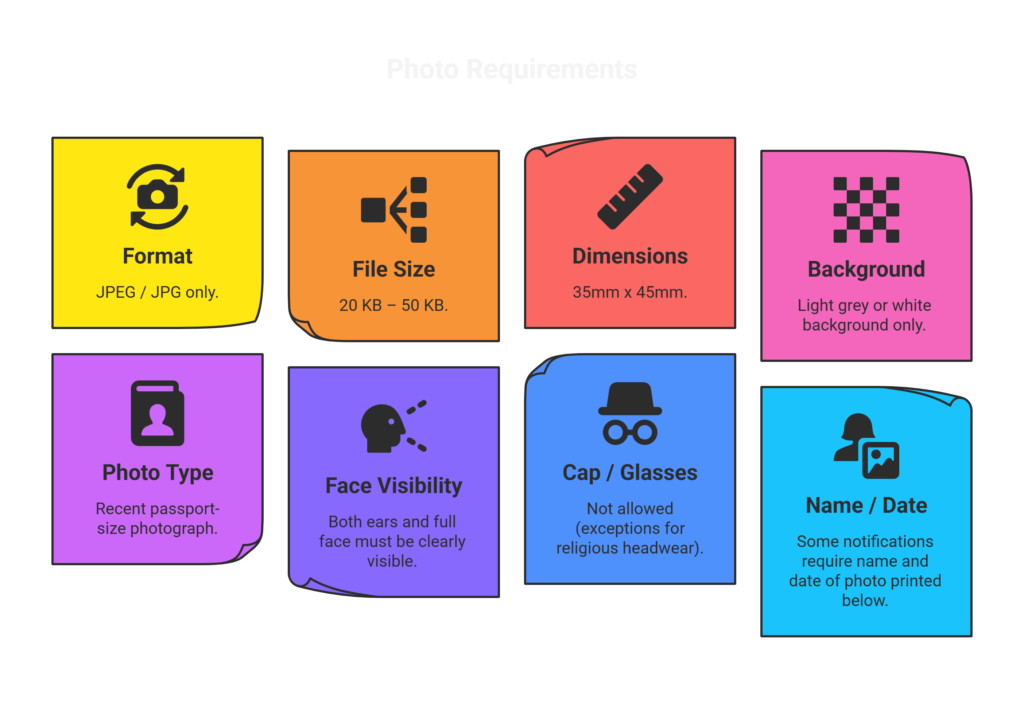
| Requirement | Details |
| Format | JPEG / JPG only |
| File Size | 20 KB – 50 KB (check current notification for exact limit) |
| Dimensions | 35mm x 45mm (or pixel equivalent, approx. 413 x 531 pixels) |
| Background | Light grey or white background only |
| Photo Type | Recent passport-size photograph |
| Face Visibility | Both ears and full face must be clearly visible |
| Cap / Glasses | Not allowed (exceptions for religious headwear) |
| Name / Date | Some notifications require name and date of photo printed below |
Important: Your photograph must be recent, ideally taken within the last three months. The same photo must be used consistently across your application form, admit card, and document verification. Do not use edited, filtered, or digitally altered backgrounds unless it closely resembles a natural white or light grey studio background.
RRB Signature Size Specifications
Your signature must be done on plain white paper using a black or dark blue pen. Scan or photograph it clearly before uploading. The requirements are:
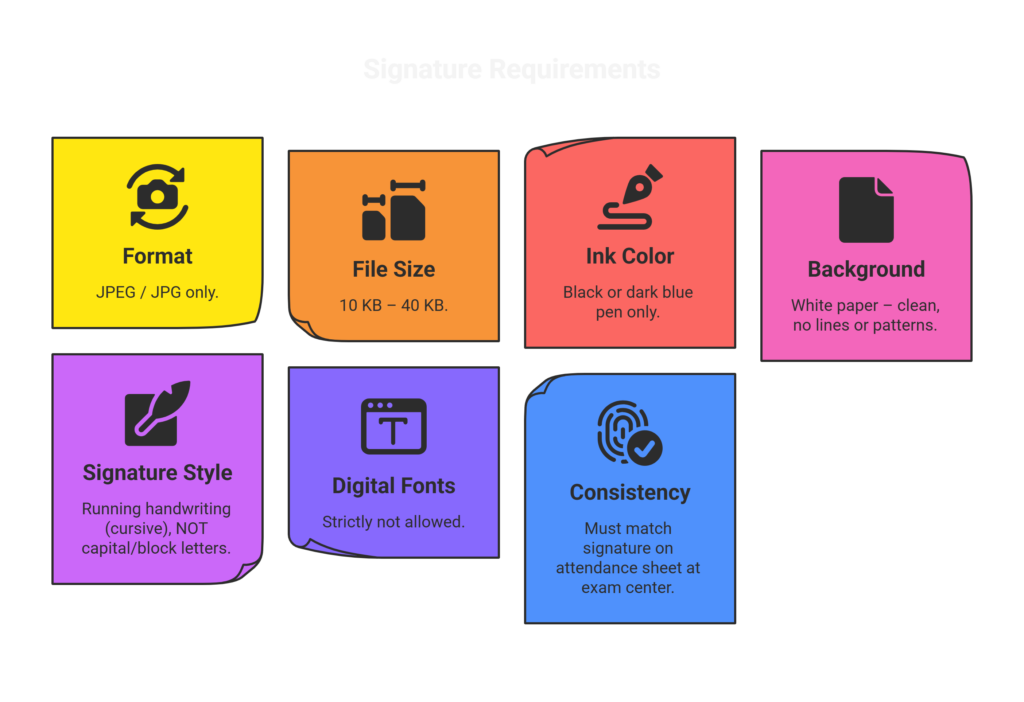
| Requirement | Details |
| Format | JPEG / JPG only |
| File Size | 10 KB – 40 KB (check current notification for exact limit) |
| Ink Color | Black or dark blue pen only |
| Background | White paper – clean, no lines or patterns |
| Signature Style | Running handwriting (cursive), NOT capital/block letters |
| Digital Fonts | Strictly not allowed |
| Consistency | Must match signature on attendance sheet at exam center |
Note: Do not sign digitally using a touchscreen or stylus. Your signature must be done on actual white paper with a pen, then scanned or photographed. Capital letters or printed-style signatures are not accepted and will result in rejection.
Latest RRB Photo and Signature Size for Different Exams
In most cases, the RRB photo and signature size remains the same across all Railway Recruitment Board exams. However, it is always a good idea to double-check the official notification for your specific exam, as minor variations may occur.
RRB NTPC Photo and Signature Size
For RRB NTPC (Non-Technical Popular Categories): The photo size requirement is typically 20 KB to 50 KB in JPEG format with a 35mm x 45mm passport-size photo on a white or light-colored background. The signature file size is usually 10 KB to 40 KB in JPEG format. Always check the official RRB NTPC notification for exact specifications.
RRB Group D Photo and Signature Size
For RRB Group D (Level 1 posts): The rrb photo size in kb is typically between 20 KB and 50 KB, and the signature size is between 10 KB and 40 KB, both in JPEG format. The rules are generally identical to those for RRB NTPC. The background must be plain white or light grey.
RRB JE Photo and Signature Size
For RRB JE (Junior Engineer): The photo and signature upload requirements for RRB JE follow the same standard. The railway photo size should be in JPG format, between 20 KB and 50 KB, and must be passport-size with a clear face on a white or light background.
RRB ALP Photo and Signature Size
For RRB ALP (Assistant Loco Pilot): Photo and signature specifications for RRB ALP are identical to other RRB exams in most years. The rrb signature size in kb is between 10 KB and 40 KB, and the photo must meet the same passport-size format with a white background and clear facial visibility.
| Always verify the exact RRB photo and signature size from the official notification on your regional RRB website (e.g., rrbchennai.gov.in, rrbbhopal.gov.in, rrbmumbai.gov.in). Specifications may vary slightly between recruitment cycles. |
How to Resize RRB Photo and Signature to Required Size
If your photo or signature file is too large or in the wrong dimensions, you can easily resize it using free tools. Here are three simple methods you can use right now.
Method 1 – Using an Online Image Compressor
This is the easiest method and works on any device, including mobile phones.
- Open any free online image compressor such as iloveimg.com, imagecompressor.com, or tinypng.com
- Upload your photo or signature file from your device
- Set the target file size. For photo: aim for 30–45 KB. For signature: aim for 15–30 KB
- Download the compressed file
- Check the file size by right-clicking the file and selecting “Properties” on Windows or “Get Info” on Mac
- If the file is within the required range, it is ready to upload
Pro tip: Do not over-compress the image. Over-compression makes the photo blurry, which can lead to rejection. Always preview the final image to make sure the face or signature is still clearly visible.
Method 2 – Using MS Paint (Windows)
MS Paint is available on all Windows computers and is a quick way to resize images.
- Open your photo in MS Paint
- Click on “Resize” in the Home tab
- Select “Pixels” instead of “Percentage”
- Make sure “Maintain aspect ratio” is checked
- Change the horizontal value to around 413 pixels (width) for a 35mm x 45mm photo
- Click OK, then go to File > Save As > JPEG picture
- Check the file size. If it is still too large, use the online compressor after saving
Method 3 – Using Mobile Apps
For candidates applying from their smartphones, the following apps work well for resizing:
- Photo & Signature Maker for Govt Exam – specifically designed for exam applications, available on Android
- Adobe Lightroom (free version) – allows precise resizing and export in JPEG with custom file size
- Resize Image app – simple drag-and-drop resizing with KB control
Pro tips for all methods: Always preview the image before uploading. Make sure the face is fully visible, the background is light, and there is no blur. For signatures, make sure all letters are clear and there are no smudges or shadow lines from the scanning surface.
Common Mistakes in RRB Photo and Signature Upload
Every year, thousands of candidates make avoidable errors during the rrb image upload guidelines step. Here are the most common mistakes and why they cause problems:
- Uploading a selfie instead of a passport photo: Selfies taken from a phone camera at home do not qualify. The background must be plain white or light grey, and the face must be properly centered.
- Incorrect file size: Uploading a photo that is either too large (over 50 KB) or too small (under 20 KB) will trigger an error in the form. Always compress or resize before uploading.
- Blurry or pixelated image: Over-compression reduces image quality. If your photo looks blurry when you zoom in, it is too compressed and may not be accepted.
- Signature written in capital or block letters: The RRB requires running handwriting (cursive). A signature written in capital letters will be rejected.
- Cropped or partial face: Both ears, the full face, and the top of the head must be visible. A tightly cropped face is not acceptable.
- Using an old photograph: Photographs should ideally be no older than three months. Using an old photo where you look significantly different can cause problems at document verification.
- Mismatch between uploaded signature and exam-day signature: If your exam-day signature looks different from what you uploaded, it can raise a discrepancy during the verification process.
- Wrong file format: Only JPEG or JPG files are accepted. PNG, PDF, or HEIC formats are not allowed.
| Consequences: If your photo or signature does not meet the required RRB photo and signature size or quality standards, your application may be rejected. In some cases, the recruitment board may give you a chance to correct the upload, but this is not guaranteed. Do not take the risk. |
Important Instructions from RRB Regarding Photo & Signature
The Railway Recruitment Board issues specific guidance on photo and signature upload with every official notification. The following points are standard across most RRB exams and should be followed carefully:
- Your photograph must be recent. If the notification specifies “taken within the last 3 months,” this must be strictly followed.
- The same photograph that you upload must be carried to the exam center on the day of the test. Do not use a different photo for the admit card print or at the venue.
- Your signature on the attendance sheet at the exam center must match the signature you uploaded during registration. Inconsistencies may lead to disqualification.
- Avoid scanning your signature or photograph against a dark or patterned surface. Shadows and patterns in the background can affect the image quality and lead to rejection.
- Do not attempt to digitally alter or enhance your photo beyond basic brightness/contrast adjustments. Heavily edited photos with artificial backgrounds are identifiable and not acceptable.
- For photographs, make sure your name and the date of the photo are printed or written at the bottom if the notification requires it. Check the instructions page of your specific RRB recruitment notification.
- Always download and keep a copy of your uploaded photo and signature for your own records until the final stage of recruitment is complete.
Official source: Always read the photo and signature upload instructions from the official notification on your regional RRB website. Different regions may have slightly different guidelines for the same exam.
RRB Photo and Signature Size – Quick Reference Table
Use this table as a quick checklist before you upload your files:
| Parameter | Photo | Signature |
| Format | JPEG / JPG | JPEG / JPG |
| File Size | 20 KB – 50 KB | 10 KB – 40 KB |
| Dimensions | 35mm x 45mm (passport size) | As per scan, not pre-defined |
| Background | White or light grey | White paper |
| Color | Color photograph | Black or dark blue ink |
| Face / Style | Full face, both ears visible | Cursive / running handwriting |
| Restrictions | No cap, no glasses, no filter | No capitals, no digital fonts |
| Recency | Within last 3 months (if specified) | Recent and consistent |
Final Checklist Before Uploading RRB Photo and Signature
Go through this 7-point checklist before you click the upload button on your RRB application form. Skipping any of these steps could cost you your application.
| # | Checklist Item | Status |
| 1 | Photo is between 20 KB and 50 KB (JPEG format) | ✓ Check before upload |
| 2 | Signature is between 10 KB and 40 KB (JPEG format) | ✓ Check before upload |
| 3 | Face is fully visible – both ears, no cap, no sunglasses | ✓ Check before upload |
| 4 | Signature is in cursive/running handwriting, not capital letters | ✓ Check before upload |
| 5 | Photograph is recent (within last 3 months if required) | ✓ Check before upload |
| 6 | Preview both files – no blur, no shadows, clear image | ✓ Check before upload |
| 7 | Photo and signature match the ID proof you will carry to the exam | ✓ Check before upload |
| Keep a printed copy of your uploaded photo and signature ready to carry to the exam center. The same photograph must be presented on the day of the exam for identity verification. |
Conclusion
Getting the RRB photo and signature size right is a small but critical step in your railway exam application. Whether you are applying for RRB NTPC, RRB Group D, RRB JE, or RRB ALP, the rules are largely consistent across all Railway Recruitment Board exams. A passport-size JPEG photo between 20–50 KB with a white background, and a cursive signature in JPEG format between 10–40 KB, will meet the standard requirements in most cases.
Always use the resize methods mentioned in this guide if your file size is too large or too small. Avoid the common mistakes listed here, and run through the final checklist before you submit. When in doubt, always refer to the official notification from your regional RRB website for the latest RRB image upload guidelines.
Good luck with your Railway Recruitment Board application. Prepare well, upload correctly, and take one step closer to your railway career.